
The online dating service, Plenty Of Fish, has been very popular recently since the pandemic hit us. You can both use the site and the app to find your significant other.
In addition to serving Canada, the United States, the UK, Australia, Brazil, New Zealand, Spain, and Ireland, POF is available in nine languages to meet the needs of individuals around the world. But login issues are very common these days. Here’s a guide for checking Plenty Of Fish Login Issues and Fixes.
Table of Contents
What Do I Do If I Can’t Log in to My Plenty of Fish Account?
There’s no denying that Plenty of Fish has successfully created a whole new dating platform for singles from around the world to meet their best matches. These services are enjoyed by many singles in the United States, the United Kingdom, Australia, Brazil and New Zealand.
The Plenty of Fish platform is free to use, but premium membership services can only be accessed after paying the premium membership fee.
To access your Plenty of Fish account anywhere, anytime, you need to remember your unique username and password. So, what can you do if you are unable to access your account? Dont worry, we will help you solve this issue in the best way possible if you are unable to access your Plenty of Fish account.
All Plenty Of Fish Login Issues And Fixes
The POF dating service is an excellent way to meet new people and find online dating, but if you can’t access your account, it is of no use.
You might be unable to log in to their services for a variety of reasons. The reason could be anything from internet issues to a temporary account ban. Here are some ways to get more insight into this.
Read: How To Delete Your Plenty of Fish Account (Quickly)
Check POF Server status
You are unable to log in to POF services because of a server outage. There are currently POF services available in Canada, the United States, the UK, Australia, Brazil, New Zealand, Spain, and Ireland.
Each of these regions has their own POF servers, which are constantly maintained by the POF developer team. Users will not be able to log in if any server is put in maintenance mode.
Reset your password
It is possible that you are trying to log in with the wrong username and password if there are no problems with the server. Please verify your credentials while logging in to the website. You can always reset your password if you forgot your login credentials.
- Click the “forgot password” link on the POF login screen.
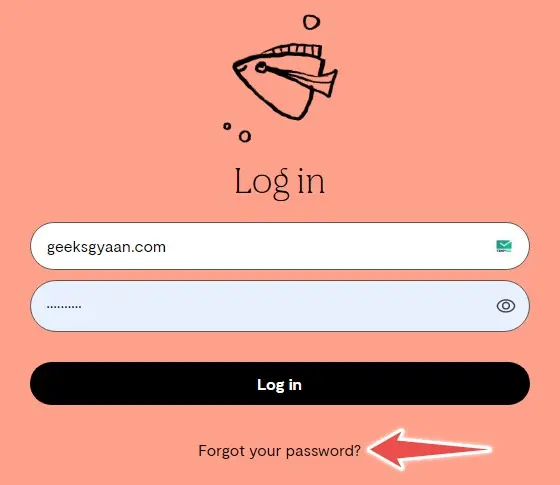
- In order to recover your password, you will need to provide your email address.
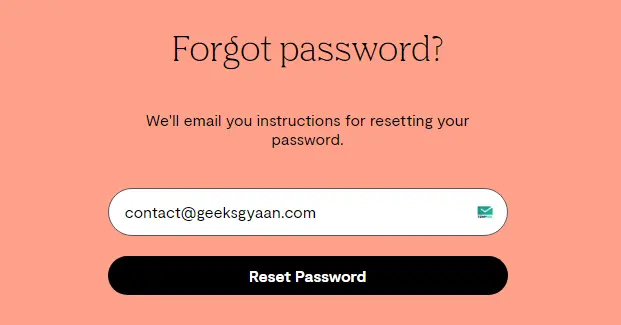
- Please check your inbox for instructions on how to reset your POF password. Once the password has been reset, try to log in with the new credentials.
Check VPN
POF operates only in a limited number of regions, as we discussed earlier. Specifically, POF provides services in Canada, the United States, the United Kingdom, Australia, Brazil, New Zealand, Spain, and Ireland at the moment.
Therefore, if you are using a VPN service outside of these specified regions, you won’t be able to log in. Disable your VPN and try to see if the problem persists.
Re-install Mobile App
In case you are experiencing Plenty Of Fish Login Issues specifically on mobile devices, you will need to re-install the app.

Try downloading the latest version of POF from the Play Store / App Store. Then try logging in and see if the issue persists.
Clear Browsing Cache & Cookies
The most common cause of Plenty Of Fish Login Issues, especially on desktop devices, is corrupt cache and cookies. Once cleared, you’ll be able to log in once again.
- Select Settings from the Chrome browser.

- Expand Clear Browsing Data on the next screen.

- On the next screen, you will see checkboxes for the browsing data elements. Click the Advanced tab to continue.

- Click on Clear Data after selecting the items as described above.
Check for Account Ban
The POF users appear to be deluded into thinking that their account has been permanently blocked and are looking for reasons for it. Plenty Of Fish has been very straightforward and bold with its answers. According to POF, any account that has been blocked must have violated their terms of service.
You will most likely lose your account if you violate Plenty of Fish’s terms and conditions. So make sure you read their terms and conditions and guidelines. You can also get in touch with the POF team to get it unblocked.
Conclusion
There are many reasons why Plenty Of Fish Login Issues occur, but often it comes down to internet connectivity or technical difficulties in their app or website. In rare cases, the POF team might block your account if you violate any of their terms and conditions.
You can try logging in on the phone of a friend once if you are still unable to log in. The POF team most probably deleted or banned your account if nothing is working.





Hi there i am kavin, its my first occasion to
commenting anywhere, when i read this article i thought i could also create comment due to
this sensible paragraph.
Hey there! Someone in my Facebook group shared this website with us so I came to look it over.
I’m definitely enjoying the information. I’m book-marking and will be tweeting this to my followers!
Excellent blog and superb design and style.
I feel that is among the such a lot vital info for me.
And i am happy studying your article. However should commentary on some normal things, The website style is wonderful, the articles is in point of fact excellent :
D. Excellent task, cheers
you’re really a excellent webmaster. The web site loading speed is amazing.
It seems that you’re doing any unique trick. Also, The contents are masterpiece.
you’ve done a wonderful job on this matter!
you are actually a just right webmaster. The website
loading speed is amazing. It kind of feels that you are
doing any distinctive trick. Also, The contents are masterwork.
you have done a excellent activity on this topic!
I am genuinely glad to glance at this weblog posts which consists of
lots of useful information, thanks for providing these kinds of statistics.
Hello there! Do you use Twitter? I’d like to follow you if that would be ok.
I’m undoubtedly enjoying your blog and look forward to
new posts.
Heya i am for the primary time here. I found this board and I find
It truly useful & it helped me out a lot. I’m hoping to provide
one thing back and aid others like you helped me.
Hello there! I know this is kind of off topic but I was wondering
which blog platform are you using for this website? I’m getting tired of
Wordpress because I’ve had problems with hackers and I’m looking at
alternatives for another platform. I would be awesome
if you could point me in the direction of a good
platform.
Appreciating the commitment you put into your website and in depth information you provide.
It’s nice to come across a blog every once in a while that
isn’t the same old rehashed information. Great read! I’ve saved your site and I’m adding your RSS feeds to my Google account.
I read this piece of writing completely about the comparison of hottest and
earlier technologies, it’s awesome article.
I visited many sites except the audio feature for audio songs current at this web site is really
wonderful.
Your style is very unique in comparison to other
folks I’ve read stuff from. I appreciate you for posting when you’ve
got the opportunity, Guess I will just book mark this blog.
Good way of telling, and nice post to take information concerning my presentation subject, which i am going to deliver in college.
No matter if some one searches for his necessary thing, so
he/she needs to be available that in detail, so that thing
is maintained over here.
When I initially left a comment I appear to have clicked
the -Notify me when new comments are added- checkbox and from now on each time a comment is added
I recieve four emails with the same comment.
Perhaps there is a way you can remove me from that service?
Kudos!
Hello! Quick question that’s completely off topic. Do you know how to make your site mobile
friendly? My site looks weird when viewing from my iphone 4.
I’m trying to find a theme or plugin that might be able to resolve this problem.
If you have any suggestions, please share. Appreciate it!
Excellent post. I was checking continuously this weblog and I
am inspired! Extremely helpful info specially the closing section 🙂 I maintain such information a lot.
I used to be looking for this particular info for a long time.
Thanks and good luck.
This design is incredible! You obviously know how to keep a reader entertained.
Between your wit and your videos, I was almost moved
to start my own blog (well, almost…HaHa!) Excellent job.
I really loved what you had to say, and more than that, how you presented it.
Too cool!
It’s awesome in favor of me to have a website, which is helpful for my experience.
thanks admin
What i do not understood is in fact how you are now not actually much more neatly-appreciated
than you may be now. You are very intelligent. You recognize therefore considerably relating to this topic,
produced me in my opinion believe it from a lot of various
angles. Its like women and men are not involved except it’s one thing to accomplish with
Woman gaga! Your personal stuffs excellent. Always handle it up!
Hi there to every one, it’s in fact a good for me to pay a
quick visit this site, it includes priceless Information.
I’m really enjoying the theme/design of your web site.
Do you ever run into any web browser compatibility issues?
A number of my blog audience have complained about my site not working correctly in Explorer but looks great in Safari.
Do you have any advice to help fix this problem?
I am sure this paragraph has touched all the internet users, its really really pleasant post on building up new blog.
Its like you read my mind! You seem to know so much about this,
like you wrote the book in it or something. I think that
you could do with a few pics to drive the message home a
little bit, but instead of that, this is great blog. An excellent read.
I’ll definitely be back.
hello!,I really like your writing very much!
share we be in contact more approximately your post on AOL?
I require an expert in this house to solve my problem.
Maybe that is you! Having a look forward to see you.
Hiya very nice website!! Guy .. Excellent .. Wonderful ..
I’ll bookmark your website and take the feeds
additionally? I’m satisfied to find so many
useful info here within the publish, we need work out more strategies in this regard, thank you for sharing.
. . . . .
Write more, thats all I have to say. Literally, it seems as though you relied on the video to make your point.
You clearly know what youre talking about, why waste your intelligence
on just posting videos to your site when you could be giving
us something informative to read?
Great info. Lucky me I recently found your website by accident (stumbleupon).
I have book marked it for later!
I was very pleased to find this great site. I want to to thank you
for ones time due to this fantastic read!! I definitely really liked every little bit of it and I have
you bookmarked to see new things on your blog.
Hello just wanted to give you a quick heads up and let you
know a few of the images aren’t loading correctly.
I’m not sure why but I think its a linking issue.
I’ve tried it in two different browsers and both show the same results.
We’re a group of volunteers and opening a new scheme in our community.
Your web site offered us with valuable info to work on. You have done
a formidable job and our whole community will be thankful to you.
Hello Dear, are you really visiting this website on a
regular basis, if so then you will without doubt obtain fastidious know-how.